

Set up from the Meilisearch Cloud dashboard
Open your project in the Meilisearch Cloud dashboard, select the Search rules tab, and click New rule. Give the rule an ID, such ashide-discontinued, and a description.
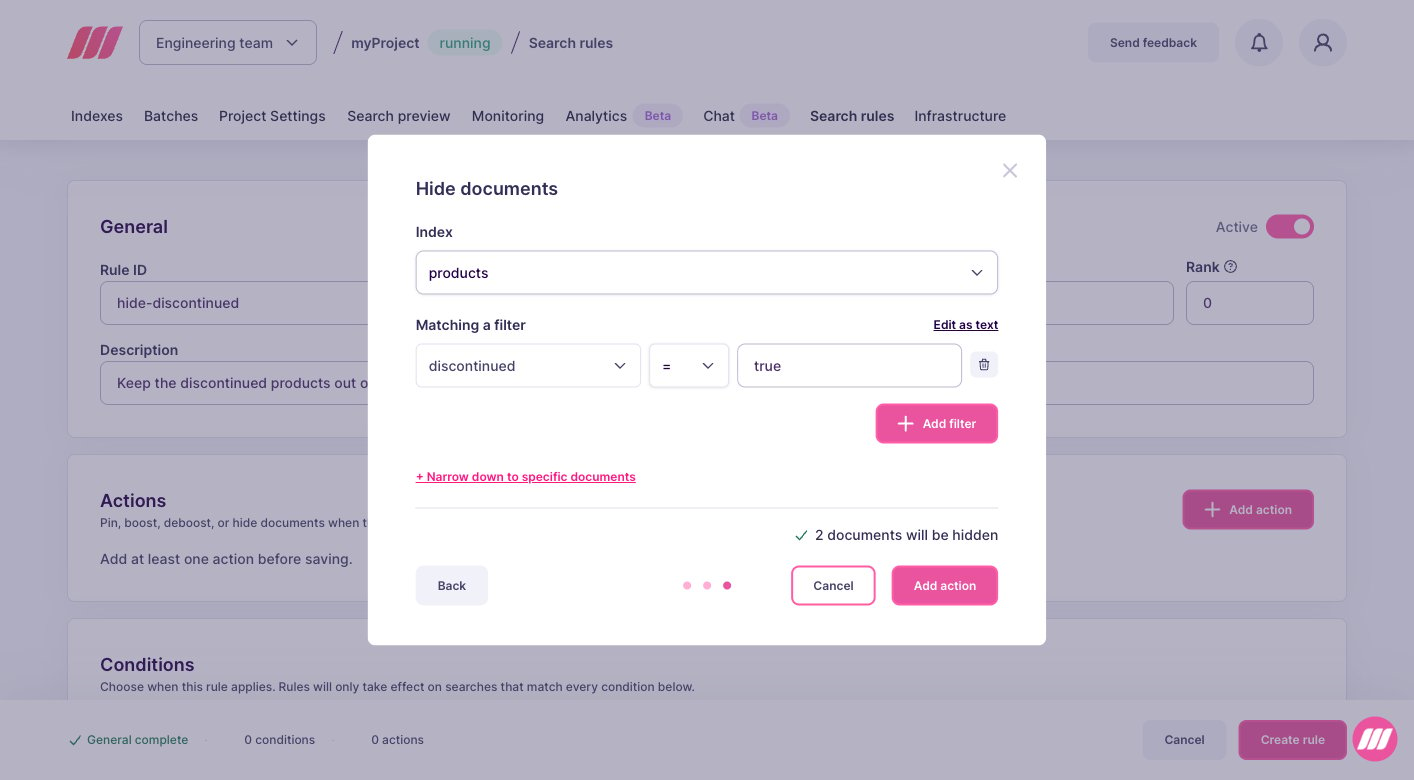
In the Actions block, click Add action, select Hide documents, then click Next. Pick Use a filter to hide a whole set of documents at once, or Pick documents by hand for a short list, then fill in the dialog:
- Index: the index holding the documents, here
products. - Filter: the condition selecting them, here
discontinued = true. The attribute you filter on must be in thefilterableAttributessetting of the index, otherwise the action selects no document.
Set up on a self-hosted instance
- Hiding is a
scaleaction with aweightof0. - Hidden documents leave the results and the facet counts, but they stay in your index. You can still retrieve them with the documents endpoints.
- If another rule pins a hidden document, the document is pinned. See specific behaviors.
- The attributes used in
filtermust be in thefilterableAttributessetting of the index, otherwise the action selects nothing.
taskUid, because creating a rule is an asynchronous operation:
succeeded status. To follow its progress, pass the taskUid to the task API.
From then on, the discontinued products disappear from the results and from the facet counts, for every search and every user, while they stay in your index.
Next steps
Deboost documents
Lower documents instead of removing them
Boost documents
Rank a selection of documents higher
Pause a rule
Bring the hidden documents back
API reference
Endpoints, rule fields, and update behavior