

Live demo: hackersearch.meilisearch.com
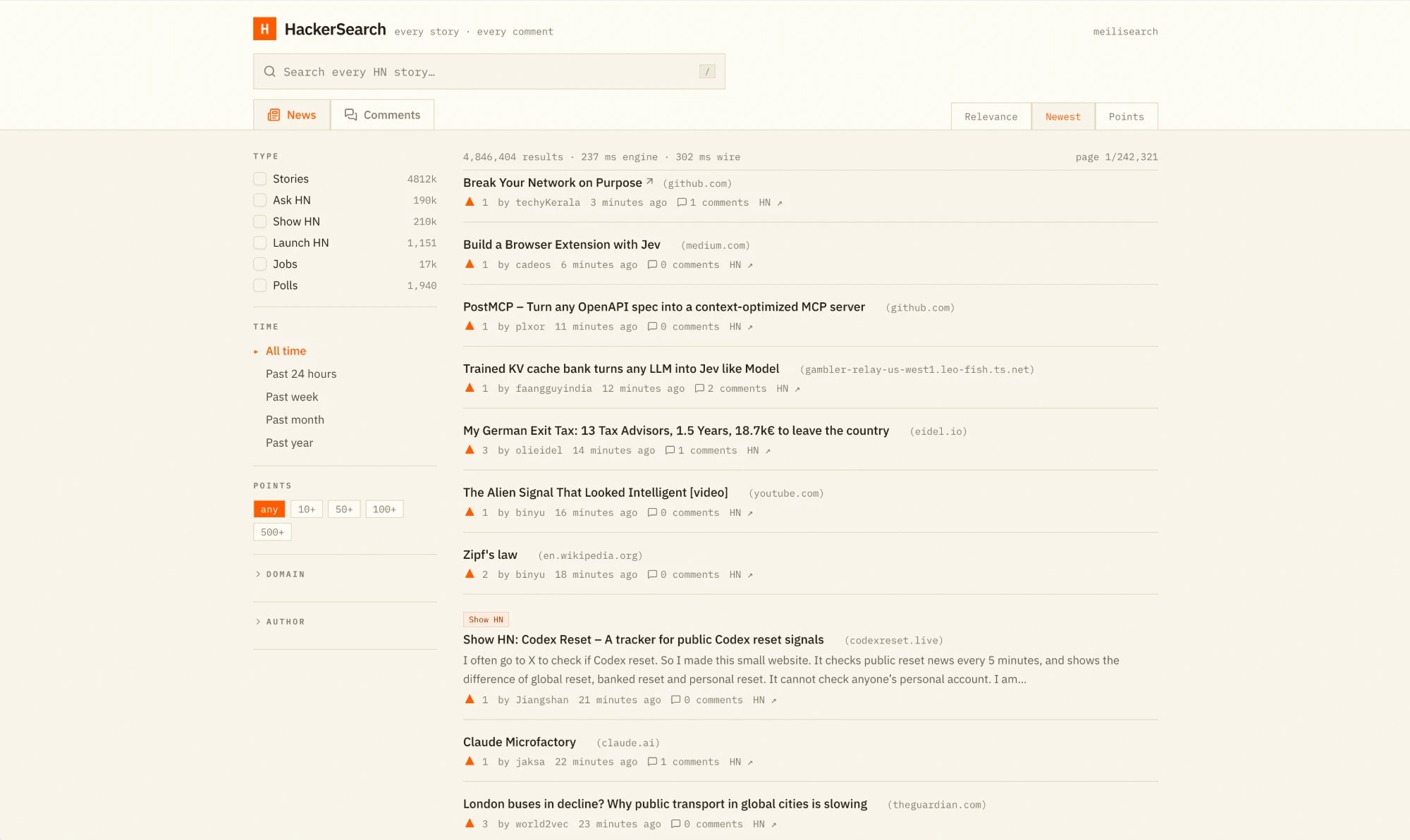
Key features
- The entire corpus: Stories, Ask HN, Show HN, Launch HN, jobs, polls, and comments, all in one index. Two tabs, News and Comments, split the corpus and the facet rail adapts to each.
- Inline autocompletion: As you type, the search box suggests the rest of the current word in grey, taken from the most popular matching story title. Press
Tabor→to accept it. - Disjunctive facet counts: Each keystroke sends a single multi-search request. For every facet with an active selection, it adds a query that excludes that facet’s own filter, so counts stay accurate while you combine filters (disjunctive facets).
- Filters on every dimension: Narrow results by type, time range, minimum points, domain, and author. Domain and author use facet search to find values among thousands of options.
- Relevance, newest, or points: Switch between relevancy ranking and explicit sorts. The
sortranking rule sits beforeattributeso the Newest and Points modes take priority, andpoints:descacts as a final tiebreaker for relevancy. - Live sync: A Rust indexer reads the Hacker News Firebase API, backfills the full history, then polls for new and updated items every 30 seconds.
- Threaded comments: Open any story or comment to read its full discussion tree, fetched directly from the index.
- Shareable searches: The query, filters, and sort live in the URL, so every search can be shared as a link.
How it’s built
A Rust indexer (hn-indexer) pulls items from the Hacker News API, strips comment HTML, and sends plain-text documents to a single hn index. A Next.js front end queries Meilisearch directly from the browser.
The index configuration keeps full-text search focused on content:
- Searchable attributes:
titleandtextonly. URLs, domains, and author names are excluded from full-text search to avoid noisy matches (for example, “dan” matching every post by the user “dang”) and remain reachable through filters. - Granular filterable attributes: Each attribute only enables the features the UI needs.
domainandauthorsupport facet search,pointsandcreated_atsupport comparison operators, and the rest only use equality. - Proximity by attribute:
proximityPrecisionis set tobyAttribute, which lowers indexing cost since titles and comment text are independent fields.
How faceting stays fast
domain and author have a huge number of distinct values across roughly 45 million documents, so computing their distributions on every keystroke would be expensive. HackerSearch only asks Meilisearch for facet counts that are actually displayed:
- High-cardinality facets load on demand: The Domain and Author sections start collapsed. Their names are only added to the
facetsparameter once you expand them, and a section stays open automatically while it has a selected value. The low-cardinalitytagsfacet (story, Ask HN, Show HN, and so on) is always computed on the News tab and skipped entirely on the Comments tab. - Exclusion queries only for active selections: Disjunctive faceting needs a separate query per facet, with that facet’s own filter removed. HackerSearch only sends that query for facets where you have selected a value. For the others, the counts from the main query are already correct.
- Facet search instead of long lists: Each expanded section shows its top values. Typing in its filter box calls the facet search endpoint to search across all values, so the page never has to load full distributions. This is why only
domainandauthorenablefacetSearchin the index settings. - Cancel superseded requests: When you keep typing, the in-flight request for the previous query is aborted, so slow responses never pile up.
How autocompletion works
Autocompletion needs no dedicated suggestions index. It rides along in the same multi-search request as the results and facets, as one extra query:attributesToSearchOnlimits matching to story titles, so suggestions read like real headlines rather than fragments of comments. See configure searchable attributes.filterexcludes comments, which have no title.sort: ["points:desc"]returns the most upvoted matching story. Meilisearch treats the last query word as a prefix, someilalready matches “Meilisearch”.limit: 1andattributesToRetrievekeep the response tiny, since only one title is needed.
Links
Try the demo
Search every Hacker News story and comment
Source code
Explore the indexer and front end on GitHub
Faceted search
Build filters and facets in your app
Multi-search
Send several queries in one request