Resource management applies to resource-based projects only. Usage-based projects scale automatically and do not have a configurable resource tier. If you are on a usage-based plan and want more control over your infrastructure, you can migrate to a resource-based project at any time by creating a new resource-based project and re-indexing your data.
You can change a project’s resource tier at any time from the Meilisearch Cloud project settings. Scaling up increases available CPU and RAM, scaling down reduces costs.

Resource tiers

Each tier defines the CPU, RAM, and storage available to your project. The exact tiers and their prices are shown in the Cloud UI and on the Meilisearch pricing page. General guidelines for choosing a tier:
SituationGuidance
Index fits comfortably in RAMKeep a tier where RAM exceeds your index size by at least 20%
High query volume (hundreds of QPS)Choose a tier with more CPU cores
Large vector dimensions or many embedded documentsPrefer higher RAM tiers; vector indexes grow quickly
Development or staging environmentUse the smallest tier to minimize cost

When to scale up

Signs that your project needs more resources:
  • Search latency (p95 or p99) increases during peak traffic
  • Indexing tasks take significantly longer than usual
  • Memory usage stays near 100% in the usage metrics dashboard
  • CPU usage is consistently high during search-heavy periods

Changing the plan

  1. Open your project in the Meilisearch Cloud dashboard.
  2. Go to Settings and find the Resource plan section.
  3. Click Change plan.
Screenshot needed: Replace this placeholder with a screenshot of the resource settings panel showing the current plan and a “Change plan” button before publishing.
Meilisearch Cloud project resource settings panel
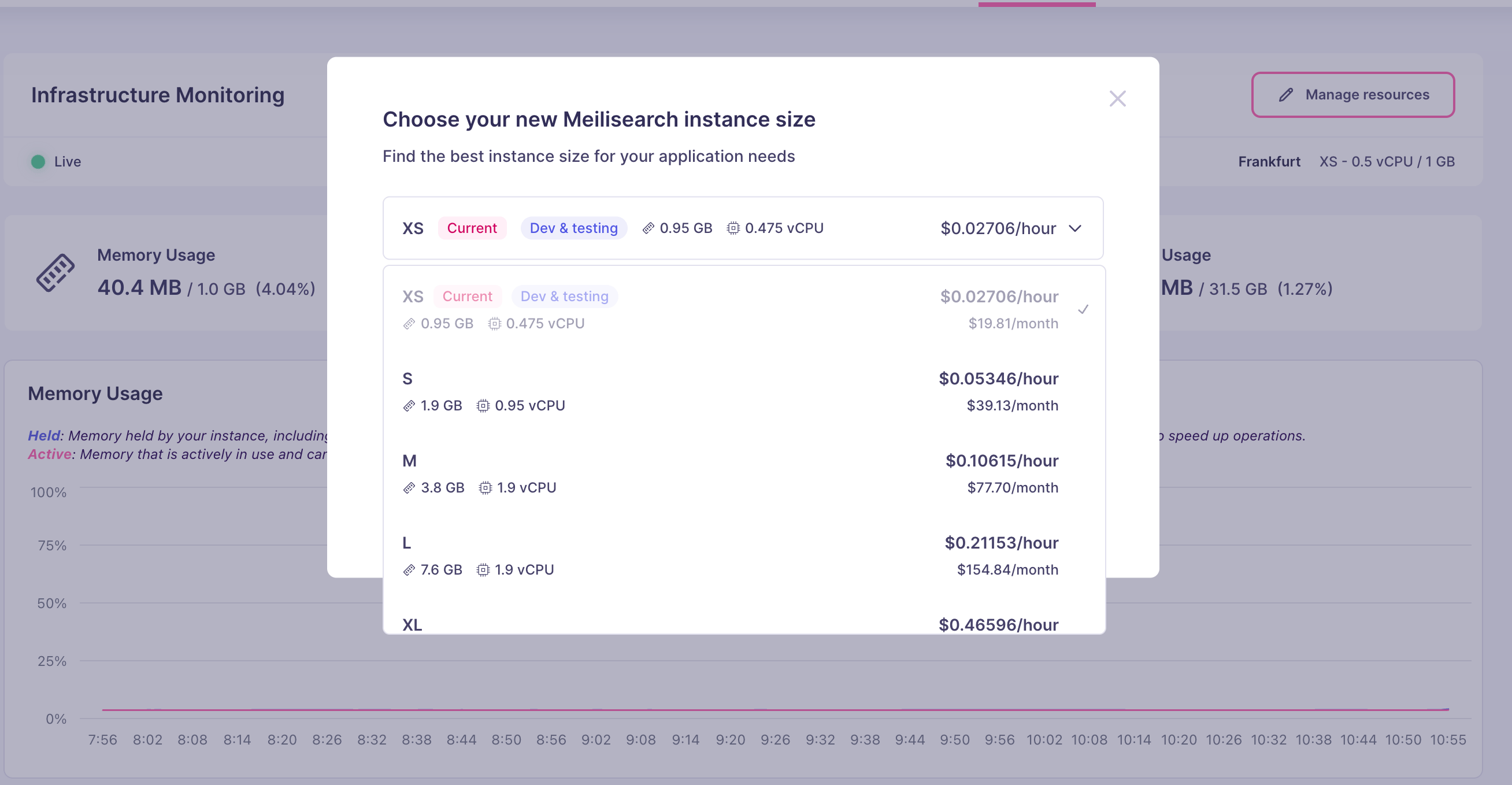
  1. Select the desired tier from the plan picker.
Screenshot needed: Replace this placeholder with a screenshot of the plan selection UI showing available tiers with CPU, RAM, and pricing information before publishing.
Meilisearch Cloud plan selection UI showing available resource tiers
  1. Click Confirm. The change takes effect shortly. Search and indexing operations remain available during the transition on most plan changes.
Impact on billing

Resource-based projects are billed by the hour. When you change resource tiers, the new rate applies from the next hour. You are never double-billed: at most, you may be charged for a partial hour at the old rate before the new rate kicks in. See Pricing model for details.