> ## Documentation Index
> Fetch the complete documentation index at: https://www.meilisearch.com/docs/llms.txt
> Use this file to discover all available pages before exploring further.
# Exporting and importing dumps
> Dumps are data backups containing all data related to a Meilisearch instance. They are often useful when migrating to a new Meilisearch release.
A [dump](/resources/self_hosting/data_backup/overview#dumps) is a compressed file containing an export of your Meilisearch instance. Use dumps to migrate to new Meilisearch versions. This tutorial shows you how to create and import dumps.
Creating a dump is also referred to as exporting it. Launching Meilisearch with a dump is referred to as importing it.
## Creating a dump
### Creating a dump in Meilisearch Cloud
**You cannot manually export dumps in Meilisearch Cloud**. To [migrate your project to the most recent Meilisearch release](/resources/migration/updating), use the Cloud interface:
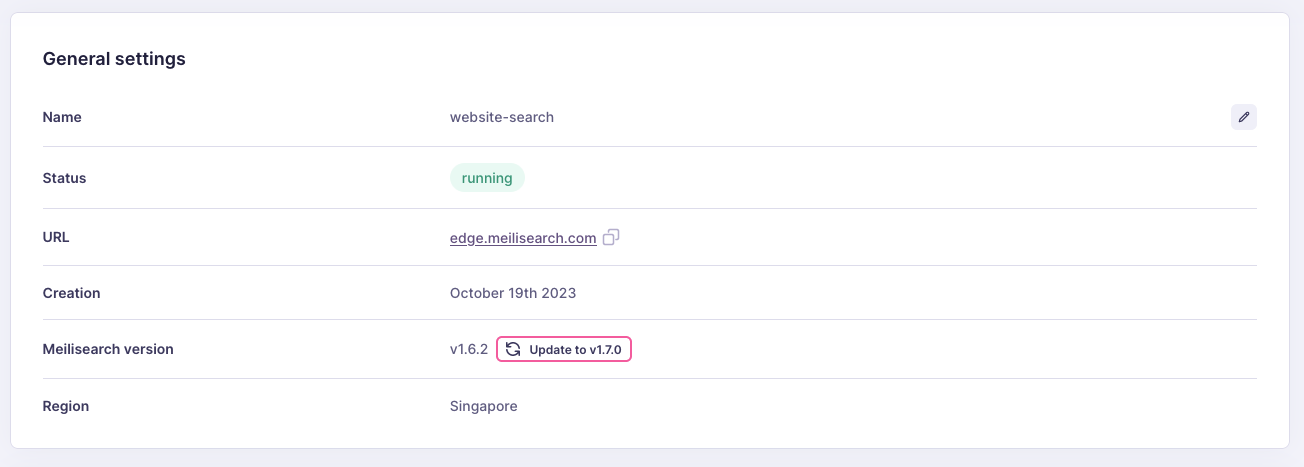 If you need to create a dump for reasons other than upgrading, contact the support team via the Meilisearch Cloud interface or the [official Meilisearch Discord server](https://discord.meilisearch.com).
### Creating a dump in a self-hosted instance
To create a dump, use the [create a dump endpoint](/reference/api/management/create-dump):
```bash cURL theme={null}
curl \
-X POST 'MEILISEARCH_URL/dumps'
```
```javascript JS theme={null}
client.createDump()
```
```python Python theme={null}
client.create_dump()
```
```php PHP theme={null}
$client->createDump();
```
```java Java theme={null}
client.createDump();
```
```ruby Ruby theme={null}
client.create_dump
```
```go Go theme={null}
resp, err := client.CreateDump()
```
```csharp C# theme={null}
await client.CreateDumpAsync();
```
```rust Rust theme={null}
client
.create_dump()
.await
.unwrap();
```
```swift Swift theme={null}
client.createDump { result in
switch result {
case .success(let dumpStatus):
print(dumpStatus)
case .failure(let error):
print(error)
}
}
```
```dart Dart theme={null}
await client.createDump();
```
This will return a [summarized task object](/reference/api/tasks/get-task) that you can use to check the status of your dump.
```json theme={null}
{
"taskUid": 1,
"indexUid": null,
"status": "enqueued",
"type": "dumpCreation",
"enqueuedAt": "2022-06-21T16:10:29.217688Z"
}
```
The dump creation process is an asynchronous task that takes time proportional to the size of your database. Replace `1` with the `taskUid` returned by the previous command:
```bash cURL theme={null}
curl \
-X GET 'MEILISEARCH_URL/tasks/1'
```
```javascript JS theme={null}
client.tasks.getTask(1)
```
```python Python theme={null}
client.get_task(1)
```
```php PHP theme={null}
$client->getTask(1);
```
```java Java theme={null}
client.getTask(1);
```
```ruby Ruby theme={null}
client.task(1)
```
```go Go theme={null}
client.GetTask(1);
```
```csharp C# theme={null}
TaskInfo task = await client.GetTaskAsync(1);
```
```rust Rust theme={null}
let task: Task = client
.get_task(1)
.await
.unwrap();
```
```swift Swift theme={null}
client.getTask(taskUid: 1) { (result) in
switch result {
case .success(let task):
print(task)
case .failure(let error):
print(error)
}
}
```
```dart Dart theme={null}
await client.getTask(1);
```
This should return an object with detailed information about the dump operation:
```json theme={null}
{
"uid": 1,
"indexUid": null,
"status": "succeeded",
"type": "dumpCreation",
"canceledBy": null,
"details": {
"dumpUid": "20220621-161029217"
},
"error": null,
"duration": "PT0.025872S",
"enqueuedAt": "2022-06-21T16:10:29.217688Z",
"startedAt": "2022-06-21T16:10:29.218297Z",
"finishedAt": "2022-06-21T16:10:29.244169Z"
}
```
All indexes of the current instance are exported along with their documents and settings and saved as a single `.dump` file. The dump also includes any tasks registered before Meilisearch starts processing the dump creation task.
Once the task `status` changes to `succeeded`, find the dump file in [the dump directory](/resources/self_hosting/configuration/reference#dump-directory). By default, this folder is named `dumps` and can be found in the same directory where you launched Meilisearch.
If a dump file is visible in the file system, the dump process was successfully completed. **Meilisearch will never create a partial dump file**, even if you interrupt an instance while it is generating a dump.
Since the `key` field depends on the master key, it is not propagated to dumps. If a malicious user ever gets access to your dumps, they will not have access to your instance's API keys.
## Importing a dump
Import a dump by launching a Meilisearch instance with the [`--import-dump` configuration option](/resources/self_hosting/configuration/reference#import-dump):
```bash theme={null}
./meilisearch --import-dump /dumps/20200813-042312213.dump
```
Depending on the size of your dump file, importing it might take a significant amount of time. You will only be able to access Meilisearch and its API once this process is complete.
Meilisearch imports all data in the dump file. If you have already added data to your instance, existing indexes with the same `uid` as an index in the dump file will be overwritten.
Do not use dumps to migrate from a new Meilisearch version to an older release. Doing so might lead to unexpected behavior.
If you need to create a dump for reasons other than upgrading, contact the support team via the Meilisearch Cloud interface or the [official Meilisearch Discord server](https://discord.meilisearch.com).
### Creating a dump in a self-hosted instance
To create a dump, use the [create a dump endpoint](/reference/api/management/create-dump):
```bash cURL theme={null}
curl \
-X POST 'MEILISEARCH_URL/dumps'
```
```javascript JS theme={null}
client.createDump()
```
```python Python theme={null}
client.create_dump()
```
```php PHP theme={null}
$client->createDump();
```
```java Java theme={null}
client.createDump();
```
```ruby Ruby theme={null}
client.create_dump
```
```go Go theme={null}
resp, err := client.CreateDump()
```
```csharp C# theme={null}
await client.CreateDumpAsync();
```
```rust Rust theme={null}
client
.create_dump()
.await
.unwrap();
```
```swift Swift theme={null}
client.createDump { result in
switch result {
case .success(let dumpStatus):
print(dumpStatus)
case .failure(let error):
print(error)
}
}
```
```dart Dart theme={null}
await client.createDump();
```
This will return a [summarized task object](/reference/api/tasks/get-task) that you can use to check the status of your dump.
```json theme={null}
{
"taskUid": 1,
"indexUid": null,
"status": "enqueued",
"type": "dumpCreation",
"enqueuedAt": "2022-06-21T16:10:29.217688Z"
}
```
The dump creation process is an asynchronous task that takes time proportional to the size of your database. Replace `1` with the `taskUid` returned by the previous command:
```bash cURL theme={null}
curl \
-X GET 'MEILISEARCH_URL/tasks/1'
```
```javascript JS theme={null}
client.tasks.getTask(1)
```
```python Python theme={null}
client.get_task(1)
```
```php PHP theme={null}
$client->getTask(1);
```
```java Java theme={null}
client.getTask(1);
```
```ruby Ruby theme={null}
client.task(1)
```
```go Go theme={null}
client.GetTask(1);
```
```csharp C# theme={null}
TaskInfo task = await client.GetTaskAsync(1);
```
```rust Rust theme={null}
let task: Task = client
.get_task(1)
.await
.unwrap();
```
```swift Swift theme={null}
client.getTask(taskUid: 1) { (result) in
switch result {
case .success(let task):
print(task)
case .failure(let error):
print(error)
}
}
```
```dart Dart theme={null}
await client.getTask(1);
```
This should return an object with detailed information about the dump operation:
```json theme={null}
{
"uid": 1,
"indexUid": null,
"status": "succeeded",
"type": "dumpCreation",
"canceledBy": null,
"details": {
"dumpUid": "20220621-161029217"
},
"error": null,
"duration": "PT0.025872S",
"enqueuedAt": "2022-06-21T16:10:29.217688Z",
"startedAt": "2022-06-21T16:10:29.218297Z",
"finishedAt": "2022-06-21T16:10:29.244169Z"
}
```
All indexes of the current instance are exported along with their documents and settings and saved as a single `.dump` file. The dump also includes any tasks registered before Meilisearch starts processing the dump creation task.
Once the task `status` changes to `succeeded`, find the dump file in [the dump directory](/resources/self_hosting/configuration/reference#dump-directory). By default, this folder is named `dumps` and can be found in the same directory where you launched Meilisearch.
If a dump file is visible in the file system, the dump process was successfully completed. **Meilisearch will never create a partial dump file**, even if you interrupt an instance while it is generating a dump.
Since the `key` field depends on the master key, it is not propagated to dumps. If a malicious user ever gets access to your dumps, they will not have access to your instance's API keys.
## Importing a dump
Import a dump by launching a Meilisearch instance with the [`--import-dump` configuration option](/resources/self_hosting/configuration/reference#import-dump):
```bash theme={null}
./meilisearch --import-dump /dumps/20200813-042312213.dump
```
Depending on the size of your dump file, importing it might take a significant amount of time. You will only be able to access Meilisearch and its API once this process is complete.
Meilisearch imports all data in the dump file. If you have already added data to your instance, existing indexes with the same `uid` as an index in the dump file will be overwritten.
Do not use dumps to migrate from a new Meilisearch version to an older release. Doing so might lead to unexpected behavior.