> ## Documentation Index
> Fetch the complete documentation index at: https://www.meilisearch.com/docs/llms.txt
> Use this file to discover all available pages before exploring further.
# Laravel Scout guide
> Learn how to use Meilisearch with Laravel Scout.
In this guide, you will see how to setup [Laravel Scout](https://laravel.com/docs/10.x/scout) to use Meilisearch in your Laravel 10 application.
## Prerequisites
Before you start, make sure you have the following installed on your machine:
* PHP
* [Composer](https://getcomposer.org/)
You will also need a Laravel application. If you don't have one, you can create a new one by running the following command:
```sh theme={null}
composer create-project laravel/laravel my-application
```
## Installing Laravel Scout
Laravel comes with out-of-the-box full-text search capabilities via Laravel Scout.
To enable it, navigate to your Laravel application directory and install Scout via the Composer package manager:
```sh theme={null}
composer require laravel/scout
```
After installing Scout, you need to publish the Scout configuration file. You can do this by running the following `artisan` command:
```sh theme={null}
php artisan vendor:publish --provider="Laravel\Scout\ScoutServiceProvider"
```
This command should create a new configuration file in your application directory: `config/scout.php`.
## Configuring the Laravel Scout driver
Now you need to configure Laravel Scout to use the Meilisearch driver. First, install the dependencies required to use Scout with Meilisearch via Composer:
```sh theme={null}
composer require meilisearch/meilisearch-php http-interop/http-factory-guzzle
```
Then, update the environment variables in your `.env` file:
```sh theme={null}
SCOUT_DRIVER=meilisearch
# Use the host below if you're running Meilisearch via Laravel Sail
MEILISEARCH_HOST=http://meilisearch:7700
MEILISEARCH_KEY=masterKey
```
### Local development
Laravel’s official Docker development environment, Laravel Sail, comes with a Meilisearch service out-of-the-box. Please note that when running Meilisearch via Sail, Meilisearch’s host is `http://meilisearch:7700` (instead of say, `http://localhost:7700`).
Check out Docker [Bridge network driver](https://docs.docker.com/network/drivers/bridge/#differences-between-user-defined-bridges-and-the-default-bridge) documentation for further detail.
### Running in production
For production use cases, we recommend using a managed Meilisearch via [Meilisearch Cloud](https://www.meilisearch.com/cloud?utm_campaign=laravel\&utm_source=docs\&utm_medium=laravel-scout-guide). On Meilisearch Cloud, you can find your host URL in your project settings.
Read the [Meilisearch Cloud quick start](/getting_started/overview).
## Making Eloquent models searchable
With Scout installed and configured, add the `Laravel\Scout\Searchable` trait to your Eloquent models to make them searchable. This trait will use Laravel’s model observers to keep the data in your model in sync with Meilisearch.
Here’s an example model:
```php theme={null}
belongsTo(Company::class);
}
public function toSearchableArray(): array
{
// All model attributes are made searchable
$array = $this->toArray();
// Then we add some additional fields
$array['organization_id'] = $this->company->organization->id;
$array['company_name'] = $this->company->name;
$array['company_url'] = $this->company->url;
return $array;
}
}
```
## Configuring filterable and sortable attributes
Configure which attributes are [filterable](/capabilities/filtering_sorting_faceting/getting_started) and [sortable](/capabilities/filtering_sorting_faceting/how_to/sort_results) via your Meilisearch index settings.
In Laravel, you can configure your index settings via the `config/scout.php` file:
```php theme={null}
[
'host' => env('MEILISEARCH_HOST', 'https://edge.meilisearch.com'),
'key' => env('MEILISEARCH_KEY'),
'index-settings' => [
Contact::class => [
'filterableAttributes' => ['organization_id'],
'sortableAttributes' => ['name', 'company_name']
],
],
],
];
```
The example above updates Meilisearch index settings for the `Contact` model:
* it makes the `organization_id` field filterable
* it makes the `name` and `company_name` fields sortable
After changing your index settings, you will need to synchronize your Scout index settings.
## Synchronizing your index settings
To synchronize your index settings, run the following command:
```sh theme={null}
php artisan scout:sync-index-settings
```
## Example usage
You built an example application to demonstrate how to use Meilisearch with Laravel Scout. It showcases an app-wide search in a CRM (Customer Relationship Management) application.
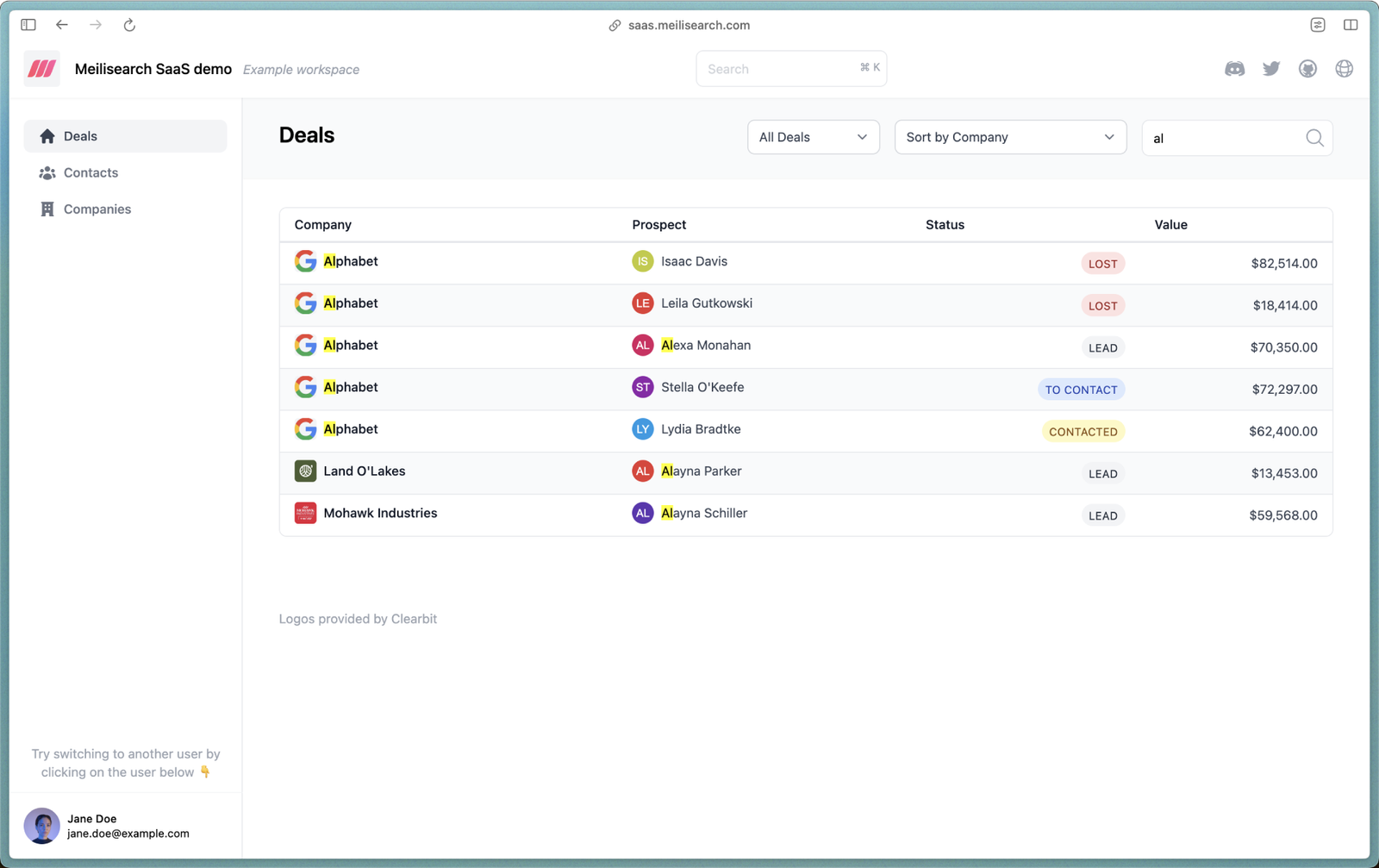 This demo application uses the following features:
* [Multi-search](/reference/api/multi-search/perform-a-multi-search) (search across multiple indexes)
* [Multi-tenancy](/capabilities/security/overview)
* [Filtering](/capabilities/filtering_sorting_faceting/getting_started)
* [Sorting](/capabilities/filtering_sorting_faceting/how_to/sort_results)
Of course, the code is open-sourced on [GitHub](https://github.com/meilisearch/saas-demo). 🎉
This demo application uses the following features:
* [Multi-search](/reference/api/multi-search/perform-a-multi-search) (search across multiple indexes)
* [Multi-tenancy](/capabilities/security/overview)
* [Filtering](/capabilities/filtering_sorting_faceting/getting_started)
* [Sorting](/capabilities/filtering_sorting_faceting/how_to/sort_results)
Of course, the code is open-sourced on [GitHub](https://github.com/meilisearch/saas-demo). 🎉